> ## Documentation Index
> Fetch the complete documentation index at: https://stackone-hub-mintlify-faq-auth-1778743786.mintlify.site/llms.txt
> Use this file to discover all available pages before exploring further.

# SAP SuccessFactors Offer Template Configuration for Offer Creation

> To configure Offer Template in SAP SuccessFactors, follow these steps

<Warning>
  This guidance assumes that you have admin privileges for your SAP SuccessFactors account.
</Warning>

# Configure Offer Template

<Note>
  Note: Offers can only be created using an Offer Template that does not include any offer approver steps.
</Note>

<Steps>
  <Step title="Go to the Offer Templates">
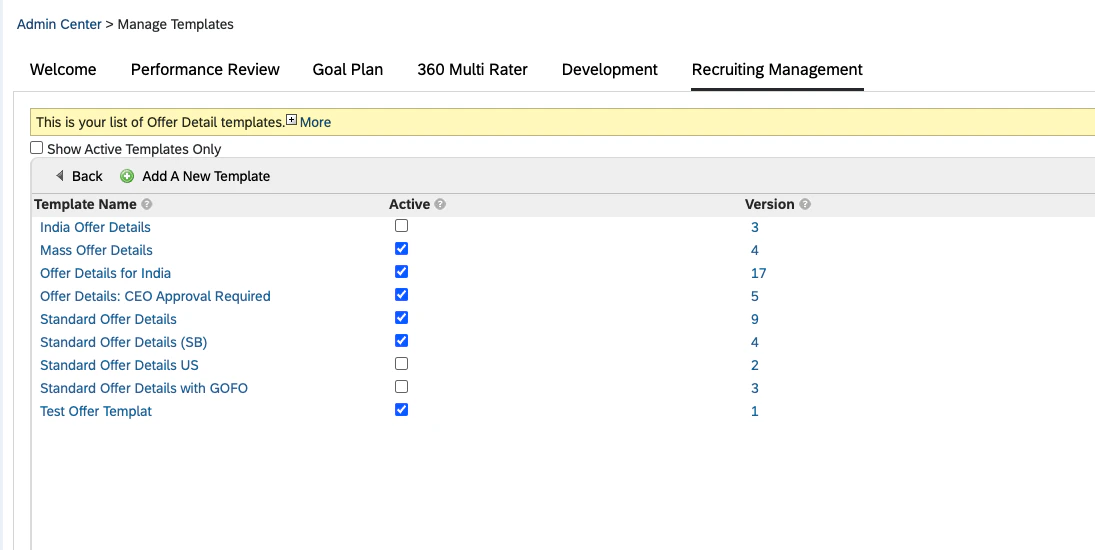
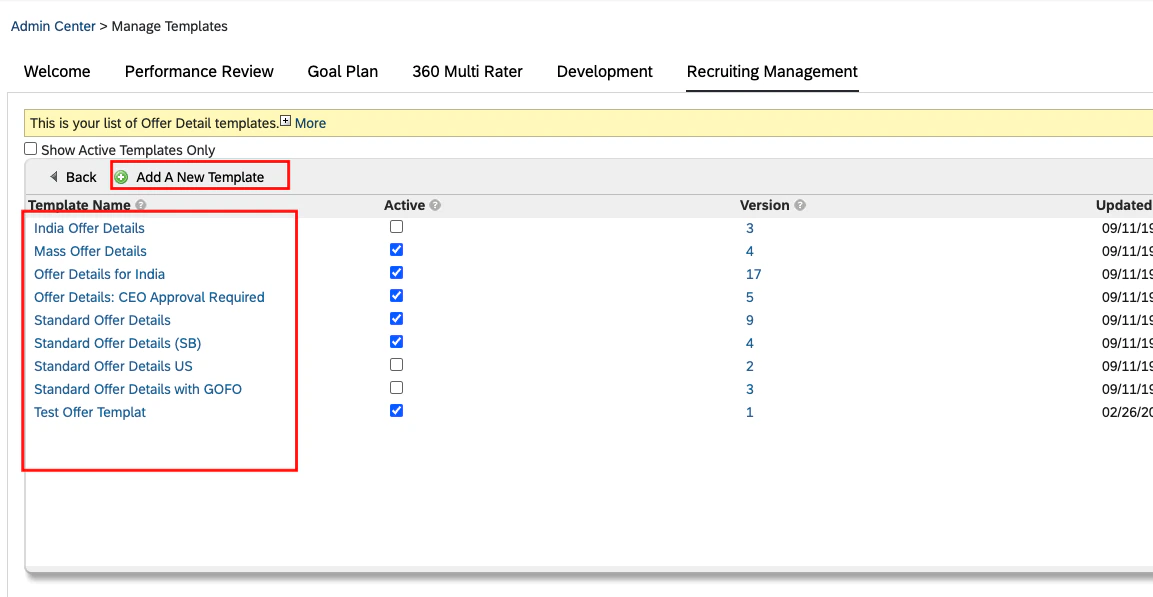
    You can find the Offer Templates by navigating to the *<b>Admin Center > Manage Templates > Recruiting Management > Offer Detail</b>*

    <Frame>
      <img className="rounded-md" style={{ margin: '0 auto', border: '1px solid #efefef' }} alt="Offer Templates" src="https://mintcdn.com/stackone-hub-mintlify-faq-auth-1778743786/R_kn2i3_q1QtG6of/images/sapsuccessfactors/sapsuccessfactors-create-offer/create-offer-1.png?fit=max&auto=format&n=R_kn2i3_q1QtG6of&q=85&s=1f0e759d01733d2e82a885863e66c9bb" width="1095" height="550" data-path="images/sapsuccessfactors/sapsuccessfactors-create-offer/create-offer-1.png" />
    </Frame>
  </Step>

  <Step title="Add/Edit Offer Template">
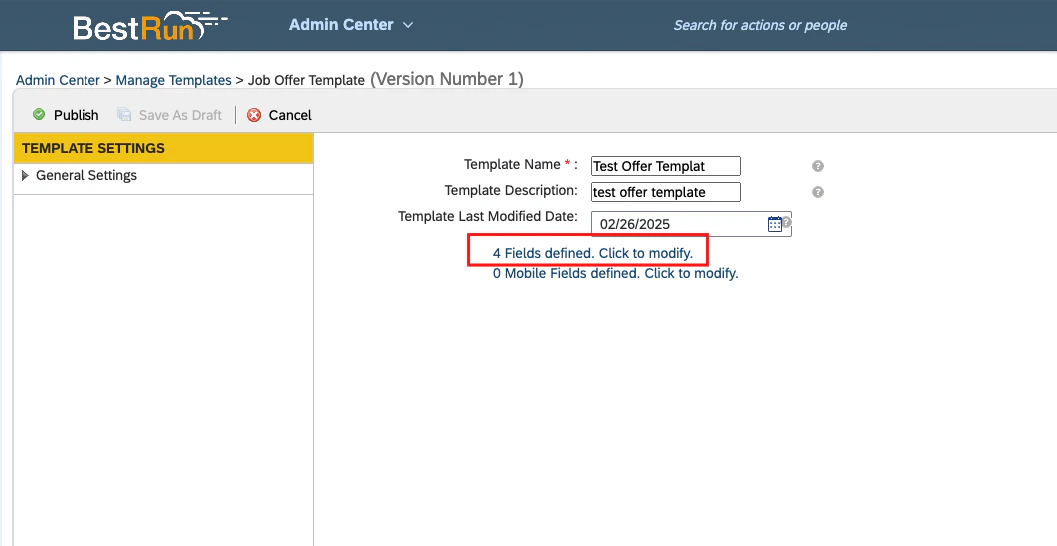
    1. Click on *<b>Add A New Template</b>* button to add a new Offer Template. if you want to update an existing one, please select the offer template which you want to update from the list.
    2. Add/Edit Template Name and then,
    3. Click on the *<b>Fields defined. Click to modify</b>* link to configure fields in the template.
    <Frame>
      <img className="rounded-md" style={{ margin: '0 auto', border: '1px solid #efefef' }} alt="Add/Edit Template" src="https://mintcdn.com/stackone-hub-mintlify-faq-auth-1778743786/R_kn2i3_q1QtG6of/images/sapsuccessfactors/sapsuccessfactors-create-offer/create-offer-2.png?fit=max&auto=format&n=R_kn2i3_q1QtG6of&q=85&s=2f2961fcf769a4f49e7c597fcc0794f3" width="1153" height="597" data-path="images/sapsuccessfactors/sapsuccessfactors-create-offer/create-offer-2.png" />
    </Frame>

    <Frame>
      <img className="rounded-md" style={{ margin: '0 auto', border: '1px solid #efefef' }} alt="Add/Edit Template" src="https://mintcdn.com/stackone-hub-mintlify-faq-auth-1778743786/R_kn2i3_q1QtG6of/images/sapsuccessfactors/sapsuccessfactors-create-offer/create-offer-3.png?fit=max&auto=format&n=R_kn2i3_q1QtG6of&q=85&s=02d7584236ab87324199f8ff742088f9" width="1057" height="546" data-path="images/sapsuccessfactors/sapsuccessfactors-create-offer/create-offer-3.png" />
    </Frame>
  </Step>

  <Step title="Configure Fields">
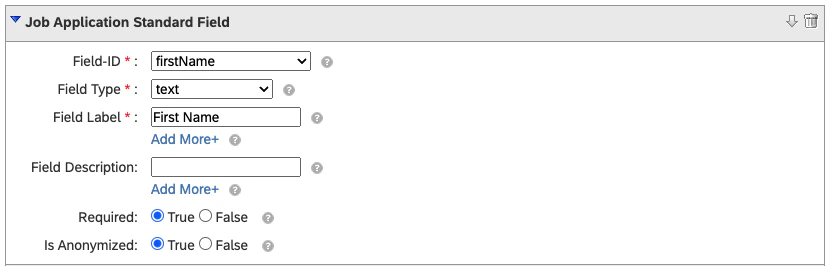
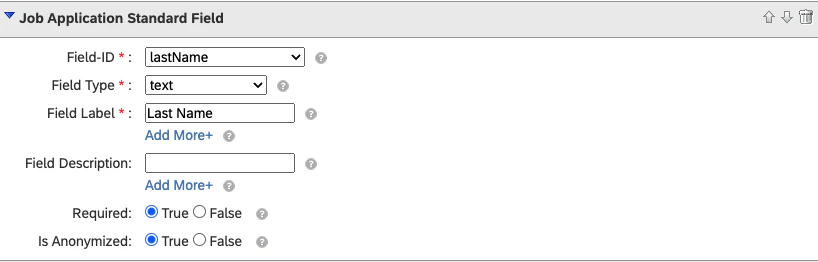
    The offer template should be configured with the following fields. Additional fields are optional.

    <b>1. firstName </b>

    <Frame>
      <img className="rounded-md" style={{ margin: '0 auto', border: '1px solid #efefef' }} alt="First Name" src="https://mintcdn.com/stackone-hub-mintlify-faq-auth-1778743786/R_kn2i3_q1QtG6of/images/sapsuccessfactors/sapsuccessfactors-create-offer/create-offer-4.png?fit=max&auto=format&n=R_kn2i3_q1QtG6of&q=85&s=3fa528d34e15a4307cbe50129c2ee2da" width="835" height="266" data-path="images/sapsuccessfactors/sapsuccessfactors-create-offer/create-offer-4.png" />
    </Frame>

    <br />

    <b>2. lastName </b>

    <Frame>
      <img className="rounded-md" style={{ margin: '0 auto', border: '1px solid #efefef' }} alt="Last Name" src="https://mintcdn.com/stackone-hub-mintlify-faq-auth-1778743786/R_kn2i3_q1QtG6of/images/sapsuccessfactors/sapsuccessfactors-create-offer/create-offer-5.png?fit=max&auto=format&n=R_kn2i3_q1QtG6of&q=85&s=efc6d63f7c93359182c312bada0d3f95" width="818" height="262" data-path="images/sapsuccessfactors/sapsuccessfactors-create-offer/create-offer-5.png" />
    </Frame>

    <br />

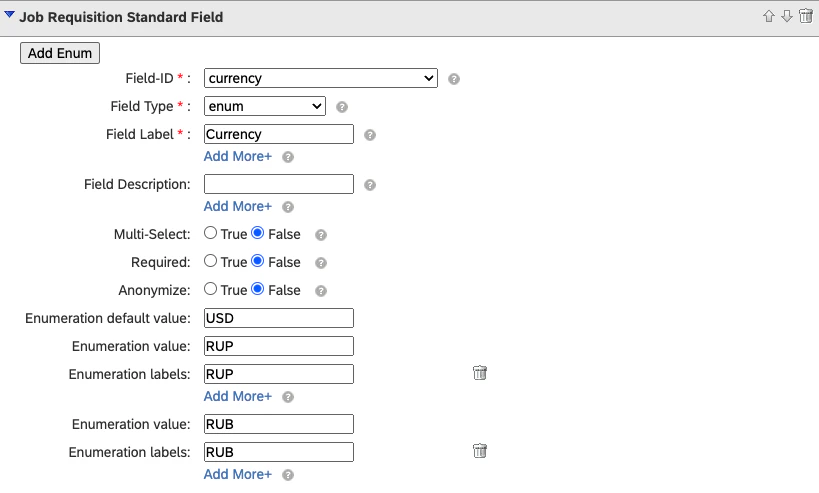
    <b>3. currency </b>

    Note: You can modify list of enums according to your use case.
    <Frame>
      <img className="rounded-md" style={{ margin: '0 auto', border: '1px solid #efefef' }} alt="Currency" src="https://mintcdn.com/stackone-hub-mintlify-faq-auth-1778743786/R_kn2i3_q1QtG6of/images/sapsuccessfactors/sapsuccessfactors-create-offer/create-offer-6.png?fit=max&auto=format&n=R_kn2i3_q1QtG6of&q=85&s=3f642a65d5d36d41673c2049a0e1710e" width="819" height="493" data-path="images/sapsuccessfactors/sapsuccessfactors-create-offer/create-offer-6.png" />
    </Frame>

    <br />

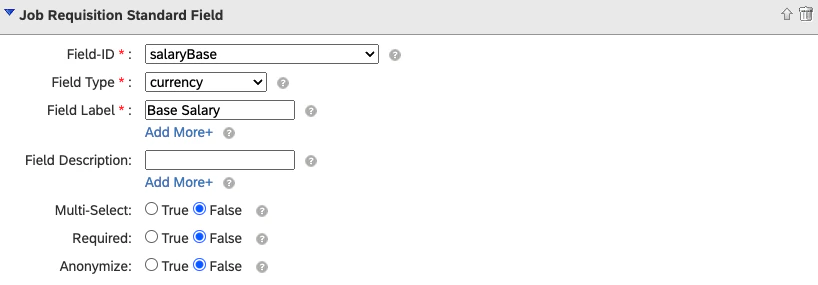
    <b>4. salaryBase </b>

    <Frame>
      <img className="rounded-md" style={{ margin: '0 auto', border: '1px solid #efefef' }} alt="Salary Base" src="https://mintcdn.com/stackone-hub-mintlify-faq-auth-1778743786/R_kn2i3_q1QtG6of/images/sapsuccessfactors/sapsuccessfactors-create-offer/create-offer-7.png?fit=max&auto=format&n=R_kn2i3_q1QtG6of&q=85&s=c44de553679679853f29703ffdfccaa4" width="818" height="285" data-path="images/sapsuccessfactors/sapsuccessfactors-create-offer/create-offer-7.png" />
    </Frame>
  </Step>

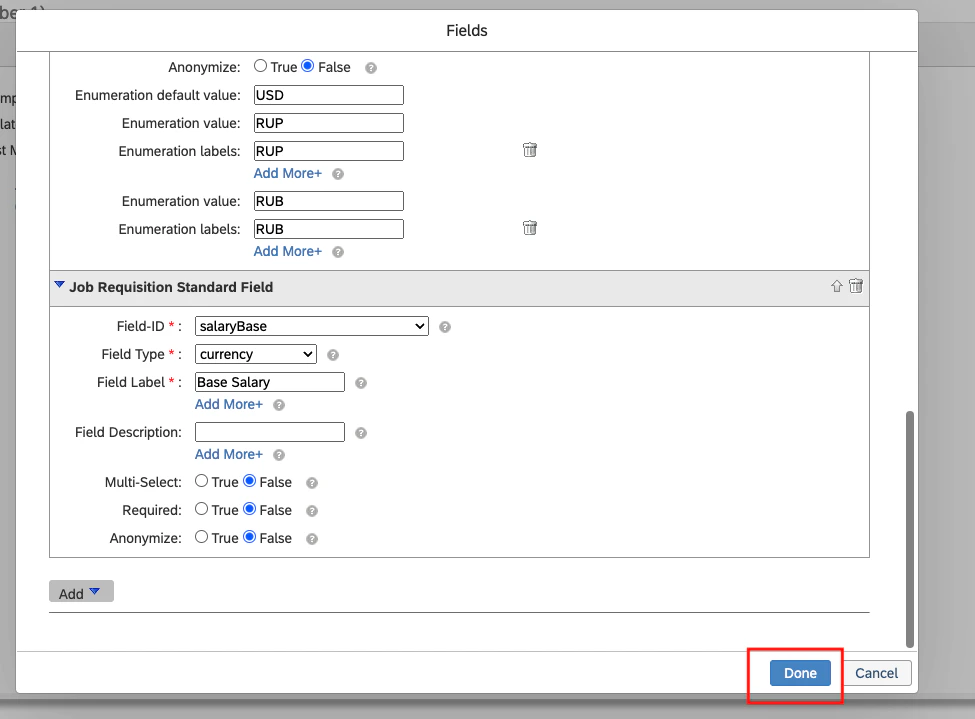
  <Step title="Save and Publish Template">
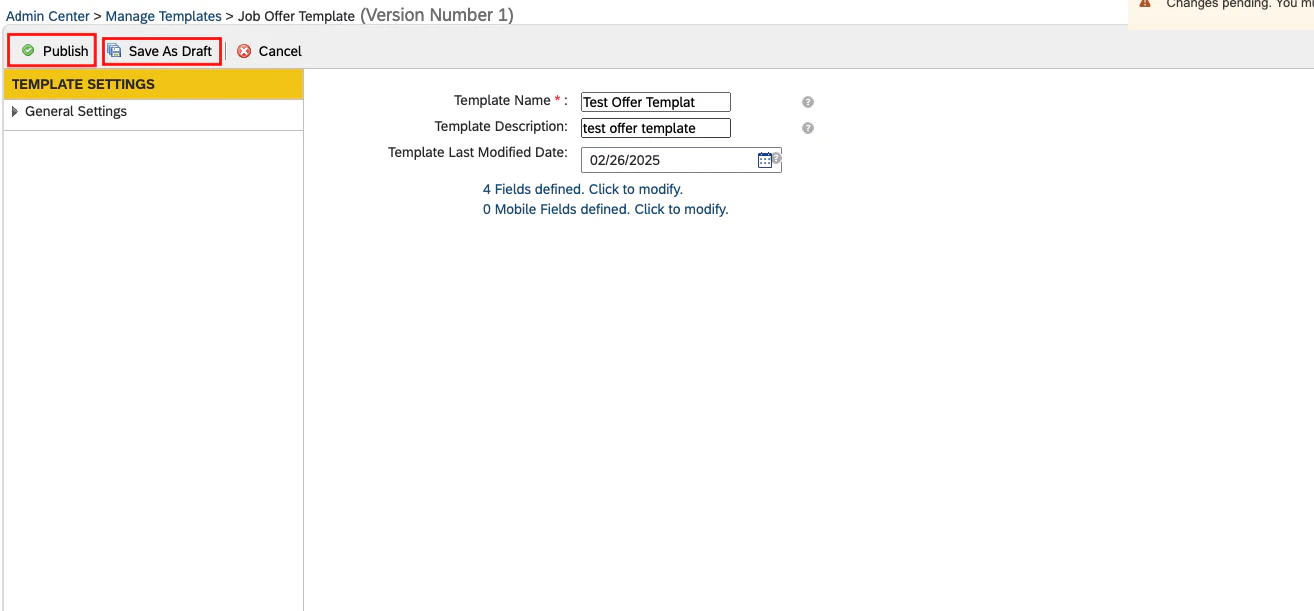
    Once the field configuration is completed, save the template as a draft and then publish it.
    <Frame>
      <img className="rounded-md" style={{ margin: '0 auto', border: '1px solid #efefef' }} alt="Add/Edit Template" src="https://mintcdn.com/stackone-hub-mintlify-faq-auth-1778743786/R_kn2i3_q1QtG6of/images/sapsuccessfactors/sapsuccessfactors-create-offer/create-offer-8.png?fit=max&auto=format&n=R_kn2i3_q1QtG6of&q=85&s=cdedd989c13888583c030c6778d30538" width="975" height="719" data-path="images/sapsuccessfactors/sapsuccessfactors-create-offer/create-offer-8.png" />
    </Frame>

    <Frame>
      <img className="rounded-md" style={{ margin: '0 auto', border: '1px solid #efefef' }} alt="Add/Edit Template" src="https://mintcdn.com/stackone-hub-mintlify-faq-auth-1778743786/R_kn2i3_q1QtG6of/images/sapsuccessfactors/sapsuccessfactors-create-offer/create-offer-9.png?fit=max&auto=format&n=R_kn2i3_q1QtG6of&q=85&s=dfdeedbee6ad06e8affa0ea2f9124559" width="1314" height="611" data-path="images/sapsuccessfactors/sapsuccessfactors-create-offer/create-offer-9.png" />
    </Frame>
  </Step>
</Steps>